
How to Build a Competitor Tracking Dashboard Without Expensive Tools

Competitive intelligence has quietly become a boardroom priority: 68% of B2B sales deals now involve a direct competitor, yet the average sales team rates its own competitive preparedness just 3.8 out of 10. The instinctive response is to buy a purpose-built platform, and enterprise CI software is a real and growing category. But for teams without a five-figure software budget, a genuinely useful competitor tracking dashboard can be assembled almost entirely from free government data, free Google tools, and a handful of no-code connectors, if it is built with the same discipline a paid platform would enforce.
Why the Expensive-Tool Assumption Is Wrong
The commercial CI tools market is expanding quickly and pricing has climbed with it: dedicated platforms in this category now range from roughly $0 at the free end to $60,000 a year for full enterprise deployments, according to a 2026 review of fifteen competitive intelligence tools. Gartner's Market Guide for Competitive and Market Intelligence Platforms projects that 40% of technology and service providers will use a commercial CI tool by 2026, up from roughly 10% just a few years earlier. That growth is real, but it also means the majority of organizations, especially smaller ones, are still not paying enterprise prices, and many never need to.
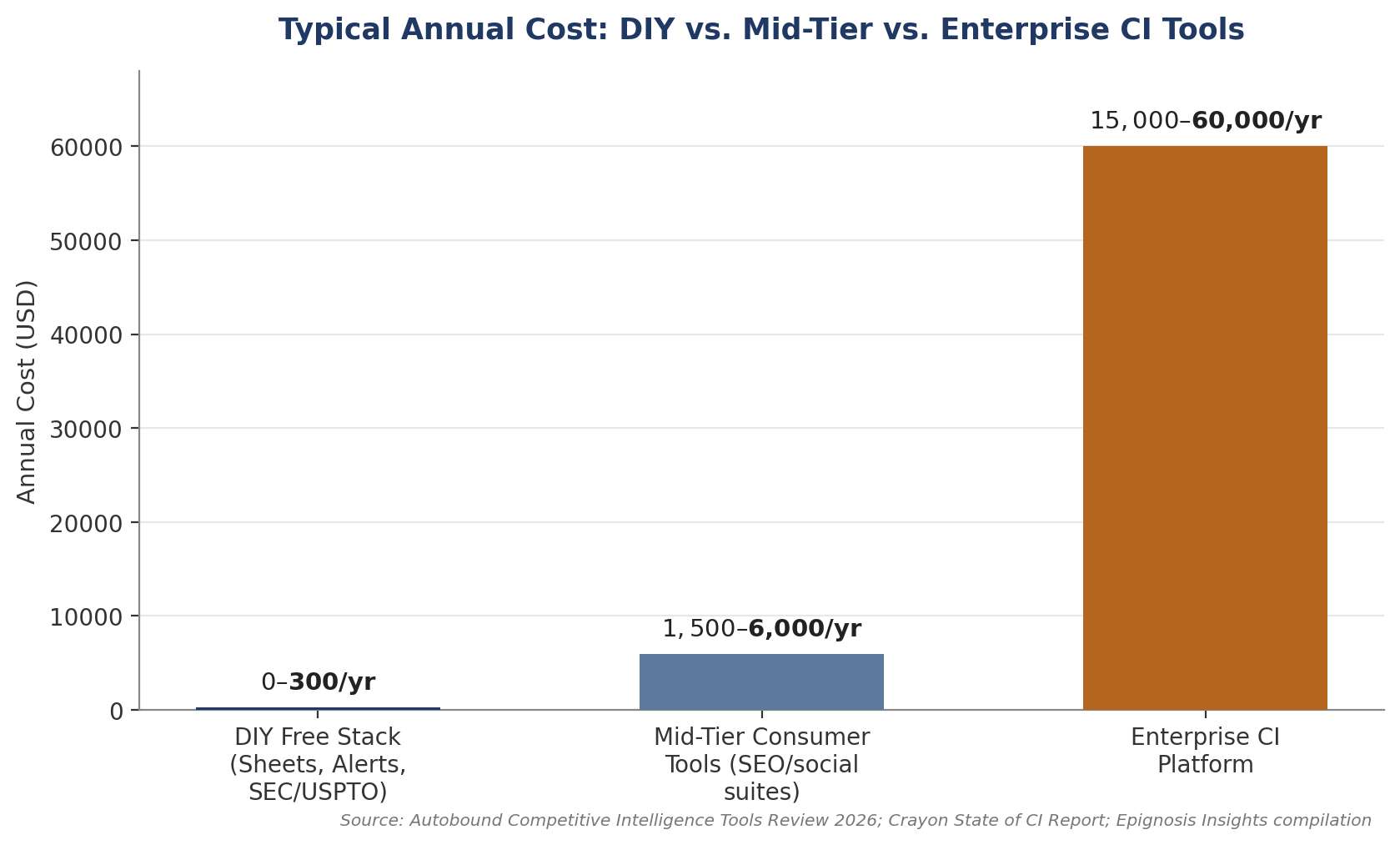
Figure 1: Typical annual cost across DIY, mid-tier, and enterprise competitive intelligence tooling.
The Bigger Risk Is Tool Sprawl, Not Tool Cost Buying software is not automatically safer than building your own dashboard. Zylo's 2025 SaaS Management Index found that 51% of purchased software licenses across the average organization sit unused, and Gartner has separately estimated that roughly 30% of enterprise SaaS spend is effectively wasted on redundant or underused tools, with organizations that fail to centrally manage their SaaS lifecycle projected to overspend by at least 25%. A lean, well-maintained free dashboard that a team actually opens every week beats an expensive subscription that gets ignored after the second month.
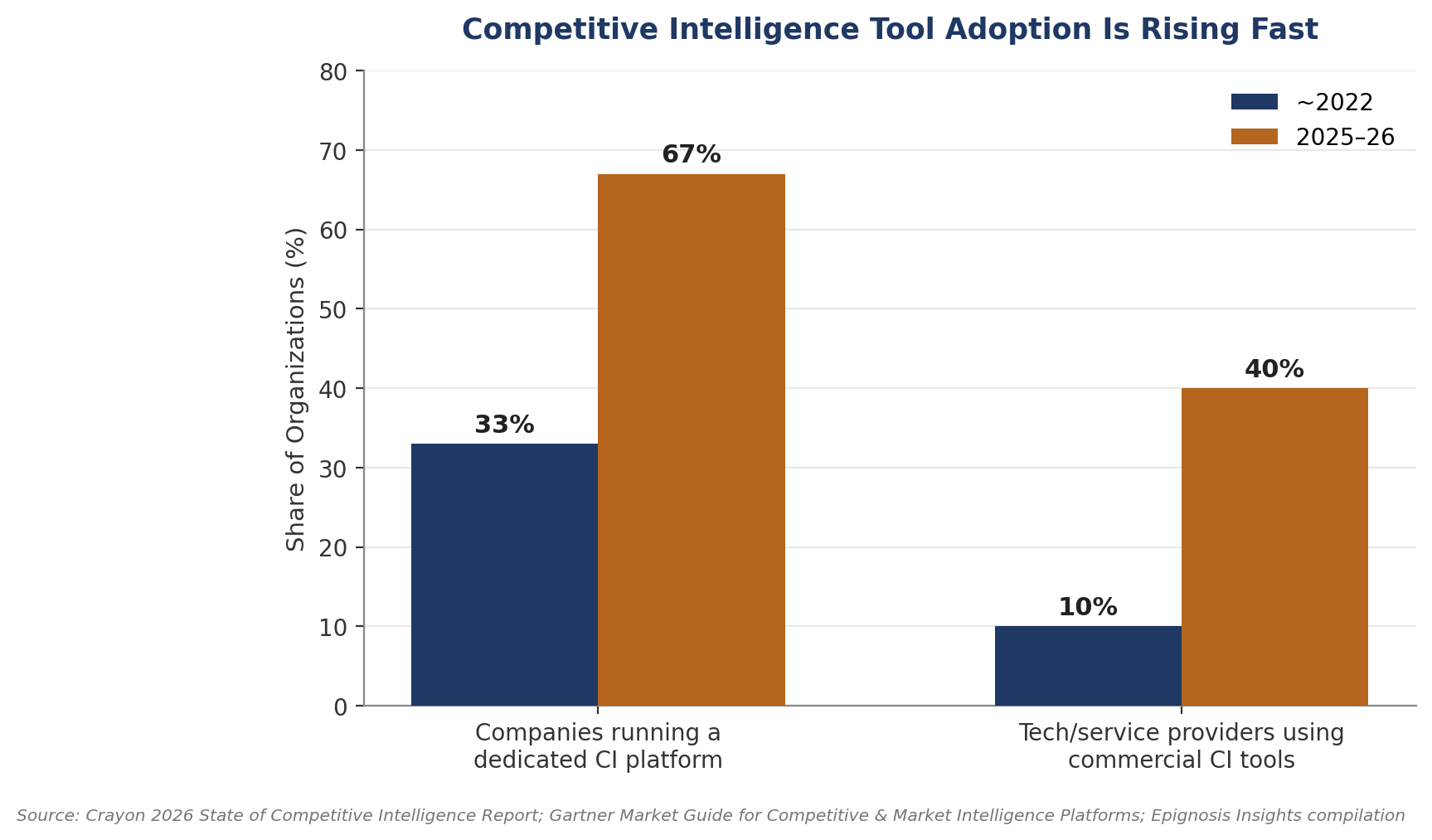
Figure 2: SaaS waste and competitive-deal frequency statistics underpinning the case for disciplined DIY tracking.
The Free Data Sources That Do the Heavy Lifting
A surprising amount of high-quality competitor data is published free by governments and platform providers, not locked behind subscriptions. In the United States, the Securities and Exchange Commission's EDGAR full-text search system lets anyone query public competitors' 10-Ks, 10-Qs, and investor presentations directly, making it a genuinely free substitute for paid financial-monitoring tools when tracking listed rivals. The U.S. Patent and Trademark Office's Patent Public Search platform performs the same function for competitor R&D activity, while in India, the Ministry of Corporate Affairs' MCA21 portal provides free access to registered competitors' filings and directorship data. Layered on top of these, Google's Looker Studio, a completely free business intelligence tool that now reaches more than ten million monthly users and connects to over 800 data sources, can turn raw spreadsheet exports from any of these sources into a shareable, auto-refreshing dashboard without a single paid license.
Assembling the Stack: A Practical Blueprint
Step One: Centralize Inputs in a Single Sheet
The foundation of any DIY competitor dashboard is a single, well-structured Google Sheet acting as the database, not a scattered collection of bookmarks and screenshots. One widely referenced open build uses Zapier to watch a dedicated Gmail inbox for competitor press releases and newsletters, automatically converting each new email into a structured row, before a second automation summarizes the content; the entire pipeline runs on a starter Zapier plan costing under $30 a month, with an open-source alternative such as n8n available at no cost at all for teams willing to self-host.
Step Two: Automate Alerts Instead of Manually Checking Sites
Google Alerts, entirely free, remains the simplest way to catch competitor mentions in news and search results in near real time, and can feed the same tracking sheet through Zapier's or n8n's native integrations. Layering in RSS feeds from competitor blogs and press pages closes most of the remaining monitoring gap without a paid web-scraping subscription.
Step Three: Visualize and Share Without a BI License
Once data lands consistently in the sheet, Looker Studio connects directly to Google Sheets and refreshes automatically, producing the same kind of dashboard view, trend lines, competitor comparison tables, alert counts by source, that a paid CI platform would charge for as a core feature. Because reports can be shared like any other Google file, distribution to stakeholders costs nothing extra either.
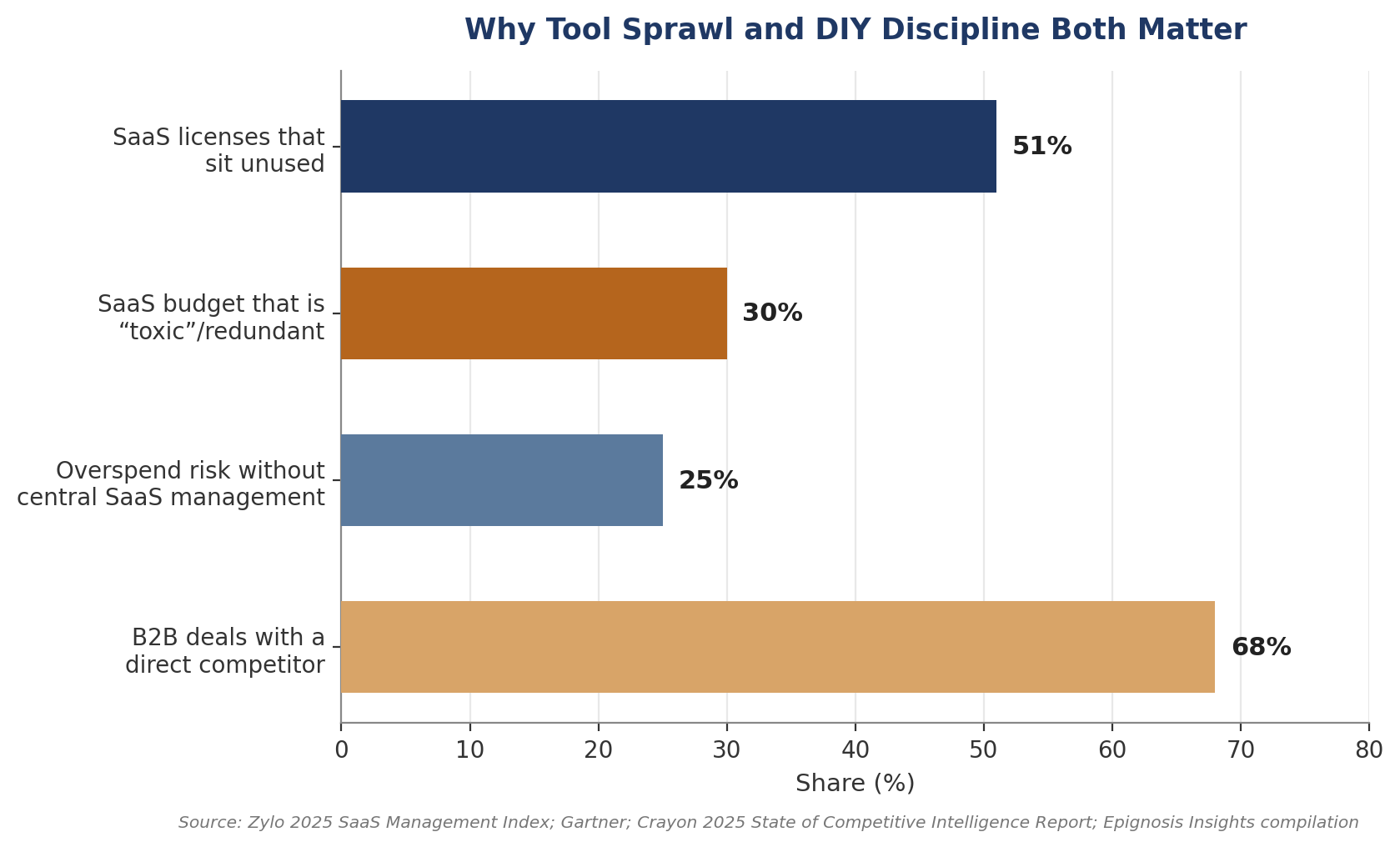
Figure 3: Share of organizations using dedicated competitive intelligence platforms, then vs. now.
Where DIY Reaches Its Limit
This approach has a ceiling. Crayon's 2026 State of Competitive Intelligence report found that two-thirds of CI teams now run a dedicated platform, up from roughly a third in 2022, largely because teams that enable sales daily with structured competitive intelligence see an 84% increase in competitive sales effectiveness, a level of real-time integration into CRM and sales workflows that a spreadsheet-based system struggles to match at scale. The practical takeaway is not that free tools are always sufficient, but that they are almost always sufficient to start: a disciplined DIY dashboard proves the value of competitive intelligence internally, builds the habit of weekly review, and gives a team the evidence it needs to justify a paid platform later, on its own terms and timeline, rather than buying one speculatively on day one.